
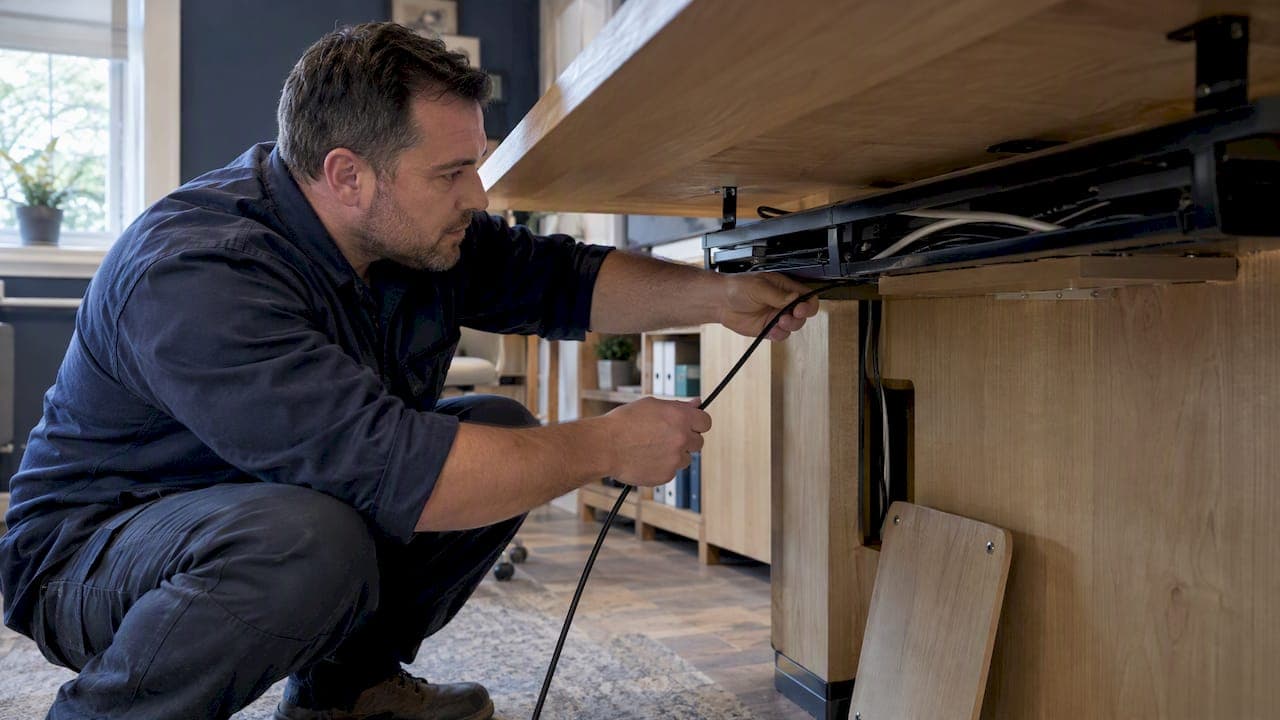
Plan first, then combine under-surface support, one defined vertical route and discreet desktop access points. Check your layout against BS 6396, the UK standard for electrical systems in furniture, before you fix anything. Start now by listing every device on your desk and marking which are permanent and which are plugged in only occasionally.
TL;DR:
- Route permanent devices such as monitors and docking stations beneath the surface, while keeping frequently used chargers near reachable sockets.
- On sit and stand desks, test the full height range before fixing routes, use a flexible spine, and leave service loops to prevent cable tension.
- BS 6396 covers the complete furniture installation, so compliant components alone are insufficient; separate power and data, provide strain relief, and arrange inspection and testing.
- Use a qualified electrician for fixed wiring, RCD installation or certification, and sign off on installations for multiple desks; plug in cable tidying is different.
Table of Contents
- Which wire management approach suits your furniture?
- How do you survey and plan your cable routes?
- Which solutions work for the desktop, underside, base and floor?
- What changes on sit–stand and height-adjustable desks?
- What do BS 6396 and sensible precautions require?
- How do you choose clips, trays, sleeves and tools?
- What is the installation and maintenance checklist?
- Why plan cable routes at the specification stage?
- How can we build integrated cable management into your bespoke furniture?
- FAQ
- Sources
Which wire management approach suits your furniture?
Most solutions fall into four groups: surface-integrated, under-surface, base-integrated and raceways. Under-surface or base routing usually forms the robust backbone, while surface fittings provide the accessible entry points. Here is the quick menu, so you can see where your own piece sits.
- Surface-integrated access points: grommets and flip-up boxes suit anything you plug and unplug often, such as laptop chargers, headphones and phones.
- Under-surface trays and baskets: these carry permanent equipment, including power strips, adapters and the bulk of excess cable, and lift it off the floor entirely.
- Base-integrated options: hollow legs and internal channels belong to new or bespoke pieces, where the route can be designed into the structure itself.
- Raceways and trunking: adhesive covered channels are the quick retrofit for wall runs or any piece you cannot modify.
- Vertical spines and sleeves: these control the drop from desktop to floor, which is where most visible clutter begins.
The best installations rarely rely on one of these alone. A typical working desk pairs a tray beneath the top, a spine at the rear and a single grommet where devices connect. A dining console that hides a lamp lead and a charging point may need nothing more than one channel and one access hole.
Think about how often you touch each cable. Anything you reach for daily wants a visible, forgiving entry point. Anything you set once and forget belongs out of sight, supported and labelled. That one question settles most product decisions before you open a catalogue.
Fit matters as much as function. A tray that clashes with a drawer runner or a leg frame is wasted money, which is why the planning section below comes before any shopping.
How do you survey and plan your cable routes?
Wire management works best when treated as an essential structural component of the furniture, considered at specification stage. Problems such as cables that are too short or have no strain relief usually trace back to skipped planning. Editorial guidance on desk setups makes the same point: decide on a system of trays, clips and covered boxes first, then fit it.
Work through these steps in order:
- Take an inventory. List every device and mark it permanent (monitors, docking stations, speakers) or temporary (phones, chargers, a guest laptop). Permanent items go on hidden routes; temporary ones need reachable sockets.
- Map entry and exit points. Choose where cables enter the furniture and where they leave. Keeping entry at the start or end of the desk run, rather than the middle, gives you a consistent path that reads as intentional.
- Measure the distances. Measure from each device to the point where the power or data source sits. Add slack for movement and for a service loop, and check the lengths of the leads you already own.
- Test the full travel of adjustable desks. Raise and lower the desk through its whole range before final fixing, watching for any cable that tightens at the extremes.
- Check underside clearance and thickness. Look at what sits beneath the top: drawer runners, frames, cross rails, leg brackets. Note the material thickness where a clamp or tray would bite.
- Plan for access. Decide how you will reach a cable later. If the only way to service a route is to dismantle the piece, redraw it.
Underside geometry deserves particular attention. Standard clamps often fail to seat securely on bespoke furniture because of unusual clearances or thicker materials, so verify measurements before specifying trays or clamp fittings.
Pro Tip: Lay your cables out on the floor beside the desk in their intended order, with the longest run first. If the bundle does not reach the planned exit point with slack to spare, change the route now rather than after fixing.
Which solutions work for the desktop, underside, base and floor?
Each zone of a piece of furniture does a different job, so choose by location rather than by product name.
Desktop
Grommets give you a clean hole through the surface, and pop-up power modules and desktop boxes bring sockets within reach without a cable draped across the edge. Recess a fitting when the surface is thick enough and the finish allows a clean cut. Surface-mount it when the top is slim, veneered with delicate material or likely to change hands, since a recess cannot be undone.
Under the surface
Wire baskets, cable trays and clamp-mounted systems hold power strips and slack out of sight. Choose a width that takes your bundle with a little room to spare, because a full tray is hard to service. Mount at the points where the structure is strongest, and keep clear of drawer travel and knee space.
Base and legs
On new or bespoke pieces, hollow legs and internal channels carry cables from top to floor without a visible run. Design these with servicing in mind: a bore wide enough to pull a plug through, a removable panel at the foot or a discreet access plate under the top. A route you cannot reach is a route you will eventually cut open.

Wall and floor raceways
When concealment behind the furniture is impossible, adhesive trunking and covered channels tidy the run along skirting or wall. They are quick and removable, which suits rented spaces and temporary arrangements, though they sit proud of the surface and should be painted or chosen to match.
Bundling and sleeves
Sleeves and wraps tidy lateral runs and keep a group of leads together. Avoid binding too tightly. Over-tight bundling can stress the cables and trap heat from power leads, so leave the bundle slightly loose and keep power cables from running in a dense, wrapped coil.
Here is how the choices line up:
- Frequent plug and unplug: grommet or pop-up module, with a flexible lead behind.
- Permanent kit: under-surface tray with the power strip fixed inside it.
- New bespoke piece: hollow leg or channel with an access panel.
- Fixed furniture you cannot alter: adhesive trunking and a vertical sleeve.
- Long lateral run: loosely fitted sleeve, supported at regular intervals.
Whichever you choose, keep power and data on separate routes where the layout allows. The reasons are covered in the safety section, and designing for separation from the start costs nothing, whereas correcting it later usually means pulling everything out.
What changes on sit–stand and height-adjustable desks?
A moving desk punishes poor planning more than any other piece of furniture. A cable that is fine at sitting height can pull taut at standing height, loosening a plug or damaging a lead over months of use.
- Test the full travel before fixing anything. Run the desk from lowest to highest with your cables loosely in place, and look for tension at each extreme.
- Use a vertical spine or articulated conduit. These are built to flex with the desk, keeping the drop tidy while allowing the length to change.
- Keep control boxes reachable. The motor controller and its leads need servicing eventually, so route them with strain relief and never bury them behind a fixed panel.
- Leave generous service loops. Extra length folded in a tray absorbs movement; avoid tight bends around actuators and lifting columns, where a kinked cable fails early.
Weight shifts too. A tray fixed to the moving top rises and falls with it, so its contents must stay light and flexible. Heavy items such as a bulky transformer are better mounted on the fixed frame, with a loop of cable bridging to the moving part.
Pro Tip: After final fitting, raise and lower the desk three or four times with a hand on the spine, feeling for any tug. A cable that feels fine on the first pass can still snag once the weight of a full bundle is added.
What do BS 6396 and sensible precautions require?
BS 6396 is the standard for electrical systems in office furniture, and it shapes every wiring decision above. Per BSI's standards listing, the 2022 edition expects the electrical system to be designed as a complete integrated whole, with attention to socket outlet loading, strain relief, separation of power and data cabling, and inspection and testing after assembly.
Treat the standard as covering the whole furniture installation, not just the individual products fitted to it.
That last point is easy to miss. Desktop Power's BS 6396 guide stresses that the standard applies to the complete installation: power and data cabling must be separated, cables supported and strain relieved, and the installation inspected and tested as appropriate. A suitable RCD at the supply point is typically required. Buying components marked as compliant does not make the finished installation compliant.
Alongside the standard, apply plain good practice of the kind health and safety guidance promotes:
- Avoid overloaded adapters and daisy-chained extension leads.
- Inspect cables regularly for cuts, crushing or heat damage, and replace any damaged lead rather than taping it.
- Unwind cable drums fully before use, since a coiled drum under load can overheat.
- Keep power leads clear of anything that traps heat, such as dense wrapping or a closed, unventilated space.
Call a qualified electrician when the job reaches fixed wiring: connecting to a supply, fitting or certifying RCD protection, or signing off a multi-desk installation. Tidying leads you can plug in yourself is one thing; altering how a piece of furniture is wired into a building is another.
For anything beyond a single personal desk, such as shared workstations or commercial fit-outs, check the standard itself and ask the person certifying the installation what they need documented. Planning with these requirements in mind from the start is far cheaper than discovering a gap at the testing stage.
How do you choose clips, trays, sleeves and tools?
Buy for the job and the finish, not for the look of the packaging. Four criteria cover most decisions:
- Support load: a clip that holds one phone lead will not carry a power bundle.
- Adhesive compatibility: test on a hidden area first, since some adhesives mark oiled, waxed or lacquered surfaces.
- Reusability: hook-and-loop ties can be opened and rebundled; single-use ties cannot.
- Ease of maintenance: choose whatever lets you add or remove a cable without dismantling the run.
Common options and where they fit:
- Adhesive clips: light leads along a smooth, sealed surface.
- Screw clips: heavier bundles on timber undersides where a fixing will not show.
- Hook-and-loop ties: any bundle you expect to change.
- Braided sleeves: a neat, flexible cover for a group of cables on a visible run.
For trays and spacing, size the tray to the bundle with some spare capacity, and support a hanging bundle at regular intervals so it never sags under its own weight. Shorter spacing suits heavier bundles.
The toolkit is modest: a grommet cutter or hole saw sized to your fittings, a set of screwdrivers, a cable tie tool if you use ties, and the cleaning supplies to prepare a surface for adhesive. Clean and degrease before sticking anything, because adhesive on a dusty or waxed surface is the usual reason clips drop off within weeks.
What is the installation and maintenance checklist?
Follow this sequence on the day, and keep it for later checks.
- Measure and mark. Take final measurements, mark entry points and dry-fit the layout with everything unfixed.
- Fix the under-surface supports first. Trays and baskets go up before any cable is routed.
- Route the bundles. Lay cables in the planned order, longest and permanent first, with slack for service loops.
- Add the vertical spine. Fit the drop to the floor once the bundles are in place.
- Fit the desktop access points. Grommets and modules go in last, so you can cut around the finished routes.
- Test. Move any sit–stand desk through its full range, check for tension, confirm power and data stay separate, and test every accessible socket.
Maintenance is simple but easy to forget. Inspect for damage at regular intervals, avoid overloading sockets, and replace frayed leads rather than patching them.
| Stage | Key check | Why it matters |
|---|---|---|
| Pre-install | Dry-fit the layout | Catches clashes before any fixing |
| Install | Supports before cables | Keeps routes accessible |
| Post-install | Full desk travel test | Reveals tension at the extremes |
| Ongoing | Inspect leads for damage | Prevents faults and overheating |
Why plan cable routes at the specification stage?
In bespoke work, the cheapest cable management is the kind drawn in before anything is cut. Fixings added afterwards scar finishes, eat into legroom and rarely sit where the structure is strongest. Decide the routes when you decide the dimensions, and the furniture can look finished while remaining serviceable.
Check the underside geometry early. A hollow leg with a removable access panel, or a channel behind a rail, makes servicing easier than a rebuild. Done well, the permanent route disappears entirely and the piece reads as one object rather than furniture with equipment attached. The mistake I see most often is treating cables as a problem to solve after delivery, when they are really a design constraint like any other.
— Luke
How can we build integrated cable management into your bespoke furniture?

We make handcrafted bespoke furniture tailored to your project’s needs. Every piece is made to order in the size and finish you need, in close collaboration with our artisans. We work with interior designers, architects and homeowners, and we welcome trade enquiries and bespoke commissions where integrated cabling is part of the brief. If you are drawing up a specification, our guides on the supplier-ready furniture brief and custom furniture CAD drawings show how to pass routing dimensions to a maker. When you are ready, begin with our bespoke furniture collection and tell us what your furniture needs to carry.
FAQ
How do you properly organise wires?
Start by listing every device and sorting cables into permanent and temporary. Route permanent leads under the surface in a tray, keep power and data separate, and leave a little slack so nothing is under tension. Label both ends so you can trace a lead later.
How do you cable manage a sit–stand desk?
Use a vertical spine or flexible conduit that moves with the desk, and test the full height travel before fixing anything. Leave service loops, keep control boxes accessible and avoid tight bends around the lifting columns. Desk cable management guidance also stresses planning the system before you fit it.
What is cable management in furniture?
It is the planned routing, support and concealment of power and data leads within or around a piece of furniture. BS 6396 treats the furniture's electrical system as a complete integrated design, covering strain relief and the separation of power and data cabling.
How do you hide cables behind furniture?
Run adhesive trunking along the wall or skirting, paint it to match, and use a sleeve for the vertical drop. For furniture you can modify, an under-surface tray and a rear grommet keep leads out of sight while still reachable.
Sources
- Bsigroup
- Desk Cable Management Guide for Modern Offices | Desktop Power
- How to Finally Fix the Dangling Wires Behind Your Desk