
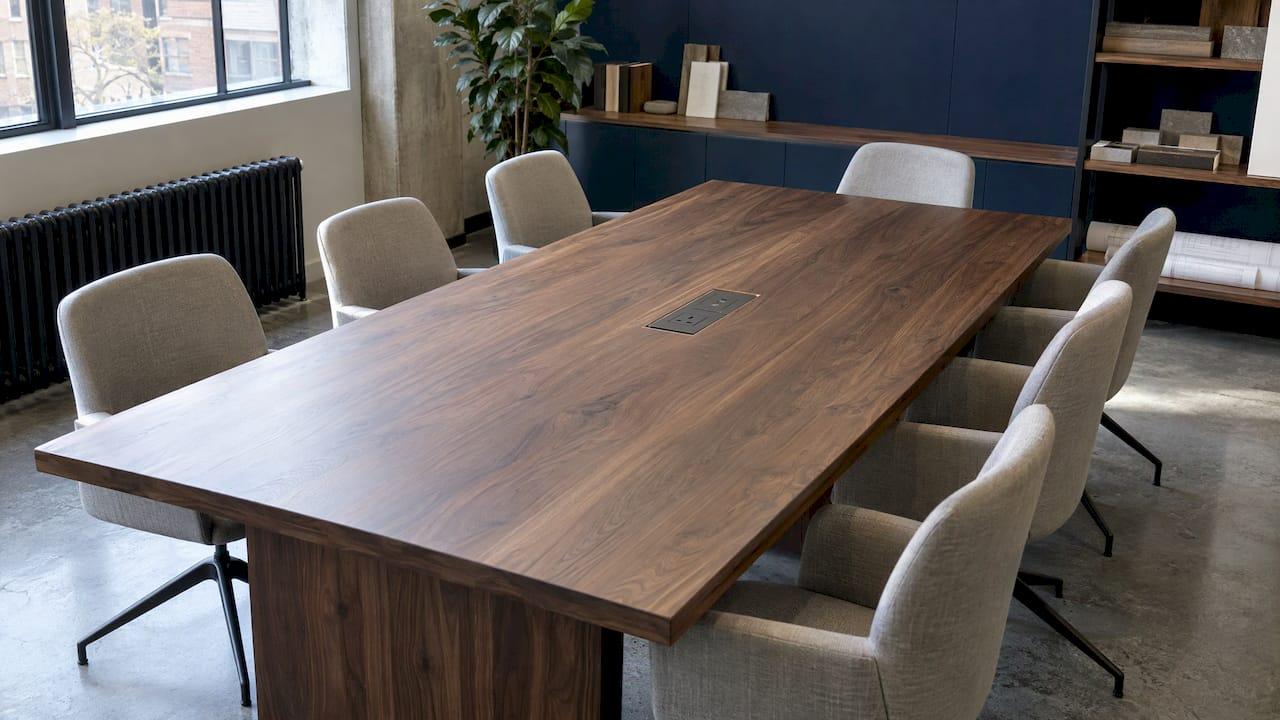
Integrated power in furniture means sockets, USB charging, data or HDMI connections built into the piece itself, rather than trailing from a wall or floor outlet. The best results come from deciding on it at design stage: where the module sits, how the cable leaves the piece and which supply it connects to. In the UK, office and educational furniture also falls under a British Standard, BS 6396, so the specification matters as much as the look.
TL;DR
- Integrated power covers flush grommets, pop-up or flip-up units and clamp-on edge modules, usually combining 13A sockets with USB-A and USB-C.
- Plan the whole route, from module to cable spine or tray to floor box or wall socket, before the piece is made.
- BS 6396 governs electrical systems in office and educational furniture, and the FIRA guide sets out protection against hazardous parts, RCD protection and earthing.
- Match the module to the use: a hot-desk of laptops needs a different mix from a desktop PC workstation or a boardroom table.
- With bespoke furniture, cut-outs, cable paths and access can be settled on the drawings, not worked around on site.
Table of Contents
- What integrated power in furniture actually means
- The main module types
- What the modules can supply
- Plan the route, not just the module
- UK standards and safety
- A short specification checklist
- Power beyond the tabletop
- Bring power into a bespoke commission
- FAQ
- Sources
What integrated power in furniture actually means
In its simplest form, it is built-in power, data and connectivity modules, such as AC outlets, USB-C and USB-A ports and HDMI, installed directly into surfaces like desks and conference tables so that electricity and network services are close to hand (Vantage). The aim is to keep a surface calm: no extension leads snaking across a floor, no adaptors balanced on a tabletop.
The idea started in offices, but it has travelled. A writing table in a hotel suite, a home-study desk, a boardroom table or a console in a hallway all benefit from a discreet place to plug in a lamp or charge a phone. For a designer, the question is not whether to include power but how to include it so that it looks as considered as the joinery around it.
The main module types
Modules are typically fitted as flush-mounted grommets, pop-up or flip-up units, or clamp-on assemblies fixed to the edge of a surface, so that they stay accessible while keeping clutter down (ØRN). A glossary of the same family adds under-desk strips and surface-mounted units to the list (Vantage).
| Module type | How it sits | Best suited to |
|---|---|---|
| Flush grommet or in-surface unit | Set into a cut-out, level with the surface | Desks and tables where a clean top matters |
| Pop-up or flip-up unit | Rises or opens when needed, hides when not | Meeting tables, dining-height tables, shared surfaces |
| Clamp-on edge module | Fixed to the edge of the top, no cut-out | Retrofits and tops that cannot be drilled |
| Under-desk strip | Fixed beneath the surface | Workstations with heavy equipment loads |
| Surface-mounted unit | Sits on top of the surface | Quick, visible access |
For a bespoke piece in a fine timber, stone or lacquered top, the choice usually comes down to how much of the surface you are prepared to interrupt. A flush or pop-up unit gives the cleanest result, but it asks for a precise cut-out and enough depth beneath. That is a conversation to have before the top is cut, not after it is finished.
What the modules can supply
Modules typically combine UK 13A sockets with USB-A and USB-C charging, and can add data or HDMI where a meeting table needs to feed a screen (ØRN). How many of each depends on who will sit there.
The Desktop Power advice makes the point well: a workstation used mainly with a desktop PC has different needs from a hot-desk where people arrive with laptops, phones and other USB-C devices, and that difference decides both the number of mains outlets and the USB charging specification (Desktop Power).
A practical way to think about it:
- A private desk: one or two mains outlets and a pair of USB-C ports is often enough, placed where the cable can fall naturally to the back edge.
- A shared or hot-desk surface: more USB-C, fewer mains sockets, and positions that serve both sides of the table.
- A boardroom or conference table: mains, data and HDMI at each seat or at regular intervals, with the base designed to carry the cable bundle.
- A hotel or residential console or bedside piece: a single mains outlet and a USB-C pair, concealed so the piece reads as furniture first.
Plan the route, not just the module
The module is the visible part. The cable route is what decides whether the installation works. A sound plan runs from the module through a port or grommet, then a cable spine or tray, to a floor box or wall socket. Floor-box positions should be confirmed early, and outlets matched to the furniture's use and any AV needs (ØRN).
Two points from the trade guidance are worth carrying into any brief:
- Simplify to a single drop point. Running cables to one point using trays or spines avoids a tangle of loose cabling under a table (Tono Systems).
- Size the base for the bundle. The furniture base has to accommodate the actual bundle of power, network and AV cables the room needs, or routing becomes restricted (Jefferson Group).
The same logic applies to a hollow-legged table, a pedestal base or a console with a back panel. If the cable cannot travel inside the piece, it will travel outside it. We have written separately about planning wire routes you can still reach, which is the companion to this section: concealment is only successful if someone can still get to the connection later.
Coordinate early with the electrical team
For larger tables, the advice is to select the table early, plan the floor power or IT sources to suit its base, and have the AV, electrical and IT teams review the tabletop module requirements (Jefferson Group). The Desktop Power guidance says much the same for desks: power is easiest to specify alongside the furniture layout, not once desks have been ordered or installed (Desktop Power).
On a renovation, shared technical drawings help keep furniture and electrical positions aligned, and a walk through the space can catch outlets that joinery has blocked (Bottomline). That source is written for the US, but the habit travels well.
UK standards and safety
This is the part not to improvise. BS 6396:2022 is the British Standard titled "Electrical systems in furniture. Specification", covering the provision and assembly of electrical power, data and telecommunications distribution systems incorporated into furniture (Desktop Power). It deals with systems in office and educational furniture connected to the mains by a 13A fused plug, and it addresses cable routing, overcurrent protection, RCD protection, earthing and testing (FIRA).
The FIRA guide to electrical accessories incorporated into furniture sets out the principles in plain terms:
- The system must prevent users from reaching hazardous parts.
- A 30mA RCD is needed where the building supply is not already RCD-protected.
- Exposed conductive parts must be earthed, or the equipment must be double insulated.
- The system carries a permanent rating label.
The same guide notes that the Electricity at Work Regulations 1989 require systems to be constructed and maintained, so far as is reasonably practicable, to prevent danger (FIRA). If you are specifying for an exhibition or temporary venue, a checklist of electrical requirements for UK exhibitions is a useful reminder of how RCD protection is checked in practice.
Cable detail under the standard
Metalicon's advice on BS 6396:2022 states that cable routes should be smooth and free from sharp edges, that cables must not be bent or twisted so as to cause damage or stress, and that on moving parts such as sit/stand desks they should be protected from chafing (Metalicon). Where no cable management system is used, the same advice puts cable supports no more than 300 mm apart.

Desktop Power adds a sensible test of a good installation: no unsupported cables, no unnecessary tension on connections and no large bundles of loose wiring hanging beneath the workstation (Desktop Power).
For anything you are specifying, ask the electrical contractor or the module supplier to confirm which standard and which installation requirements apply to the particular piece and setting. Furniture in a private home may not fall under the same scope as office furniture, but the safety principles above are still the right ones to design to, and a qualified electrician should make the final connection.
A short specification checklist
Before you brief a maker, settle these points on paper:
- Use: who sits here, and with which devices? Count laptops, phones, lamps and screens.
- Module type: flush, pop-up, clamp-on or under-surface, and the cut-out or fixing it needs.
- Supply: where the cable leaves the piece, and whether it meets a floor box or wall socket.
- Route: how it travels through legs, a spine or a tray, and how the bundle fits.
- Movement: any height adjustment or moving part that will flex a cable.
- Access: how an electrician reaches the connection in future.
- Finish: how the module, grommet or cover plate reads against the material, whether brushed metal, black or a colour-matched insert.
- Compliance: the rating label, RCD arrangements and who signs off the installation.
Writing these into the drawing package avoids the most common problem: a handsome piece arriving on site with no sensible place to plug it in. Our guide to custom furniture CAD drawings shows how to build that detail into a commission, and our note on value engineering bespoke FF&E is useful when the power specification needs to sit within a budget.
Power beyond the tabletop
Integrated power is not only about sockets on surfaces. Concealed lighting is the other common electrical element in bespoke joinery, and it has its own routing questions. Our overview of integrated drawer lighting formats covers how those are handled in UK homes. Accessibility matters too: reach ranges and the position of controls affect who can actually use a built-in outlet, which we cover in accessible furniture design.
Our perspective
Power is the detail clients remember when it is wrong and never notice when it is right. In our experience, the pieces that succeed are those where the cable route was a design decision from the first sketch, not a fix on delivery.
Because we work with skilled artisans to make each piece from scratch, in the size and finish you specify, there is room to resolve these things properly: where a cut-out sits, how the grain runs around it, and how the cable path stays discreet yet reachable. A console or desk should look sculptural first and functional second, and still be entirely practical.
We would always encourage designers, architects and hospitality teams to share the electrical intent early, so that the drawings carry it. We are always happy to work with you on that conversation.
Luke
Bring power into a bespoke commission
If you are designing a desk, console or table that needs to carry power, we can talk through size, finish and how the piece should be built around your requirements. Our bespoke furniture is handcrafted to order and customisable in size and finish, for residential and hospitality interiors, with trade access for designers and architects.

Browse the bespoke furniture collection for starting points, such as the Park Console Table, or get in touch with your drawings and we will take it from there.
FAQ
Does integrated power in furniture need to comply with a British Standard?
For office and educational furniture connected to the mains by a 13A fused plug, BS 6396 is the relevant standard, covering cable routing, overcurrent and RCD protection, earthing and testing (FIRA). Ask your electrician or module supplier to confirm what applies to your specific setting.
Which type of module is best for a boardroom table?
Pop-up or flip-up units and flush in-surface modules keep the top clear, and many combine 13A sockets, USB and data or HDMI. Choose the mix with your AV, electrical and IT teams, and plan the base to carry the cable bundle (Jefferson Group).
How do I stop cables trailing from a desk or table?
Route them through a grommet or port into a spine or tray, and bring them to a single drop point at a floor box or wall socket (Tono Systems). Decide the route before the piece is made.
How many USB-C ports and sockets should a desk have?
It depends on the equipment. A desktop PC workstation needs different provision from a hot-desk used with laptops and phones, and that decides the number of mains outlets and the USB specification (Desktop Power).
Sources
- Integrated Power Modules, Vantage
- How to Specify Office Furniture with Integrated Power, ØRN
- Electrical accessories incorporated into furniture, FIRA
- BS 6396:2022 Standard Electrical Systems in Furniture, Metalicon
- BS 6396 & Desk Power for Office Fit-Outs, Desktop Power
- How to Integrate Power and IT into a Conference Table, Jefferson Group
- Conference Table Power Modules & Cable Management Guide, Tono Systems
- How to Coordinate Design Materials and Electrical Work, Bottomline
- Exhibition electrical regulations checklist, A3M